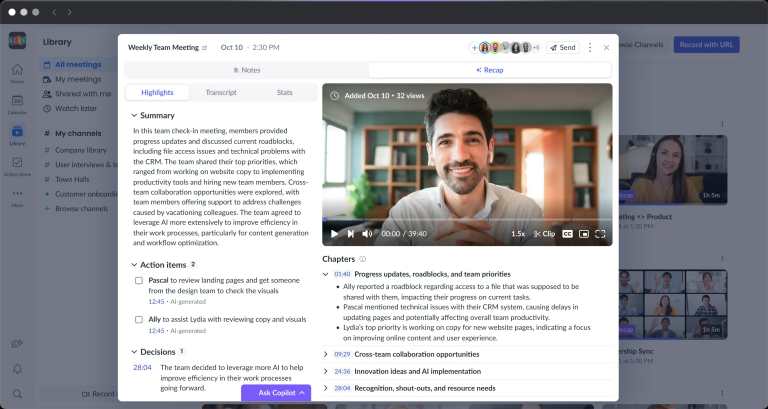
What is Fellow?
Fellow is an AI meeting assistant that records, transcribes, and summarizes meetings across video conferencing platforms and in-person sessions. Most teams lose decisions and next steps the moment a meeting ends, and nobody wants to spend time writing it all up afterward. Fellow captures that information automatically and turns it into AI summaries and action items without requiring anyone to take manual notes. It’s built for organizations that care about data governance, including teams in finance, legal, healthcare, and enterprise IT, but any team that runs a lot of meetings can use it.
The AI meeting assistant works with or without a bot joining the call. You can capture audio directly through Fellow’s desktop or mobile app, so no uninvited participant shows up in the meeting room. That flexibility makes it practical for internal calls, client conversations, and in-person discussions alike.
Fellow Video
Features & Benefits
- AI Meeting Summaries: generate context-aware summaries after every meeting that surface decisions and key points rather than a wall of transcript text; the meeting AI identifies what matters.
- Automatic Action Item Detection: pull out action items from the conversation automatically, so nothing assigned in the meeting gets lost.
- Meeting Transcription: capture a full transcript, audio, and video in one place across Zoom, Microsoft Teams, Google Meet, and in-person sessions.
- Botless Recording: record meetings through the native desktop or mobile app without a bot joining the call, which works across any conferencing tool including Slack Huddles.
- Pre-Meeting Briefs: get an AI-generated brief before a meeting starts to help you walk in prepared.
- AI Chief of Staff (Ask Fellow): query your meeting library with natural language to surface insights, prep for follow-ups, or find what was said in a past call.
- Recording Library: store all meeting notes, recordings, transcripts, and summaries in one searchable, access-controlled library.
- Compliance and Governance Controls: set organization-wide policies for who can record, who can view meeting data, and how long data is retained; includes zero-day retention, MNPI redaction, consent capture, and password-protected recaps.
- Audit Logs and Compliance Portal: log every access, deletion, and recording event to an exportable audit trail; the Compliance Portal gives admins a central place to manage governance for regulated industries.
- Role-Based Access and SSO: manage user permissions at scale with SSO, SCIM provisioning, and role-based access controls.
- MCP Server: connect your meeting data to AI meeting tools and agent-based workflows through a Model Context Protocol server.
- Integrations: connect Fellow to CRMs, project management tools, messaging apps, HR systems, workflow automation platforms, and compliance archiving services.
What can Fellow do?
- Record meetings without a bot
- Transcribe meetings automatically
- Generate AI meeting notes
- Detect and assign action items from meetings
- Summarize meetings with AI
- Search past meeting transcripts
- Prep for meetings with AI briefs
- Sync meeting insights to a CRM
- Enforce meeting recording policies across teams
- Redact sensitive content from transcripts
- Archive meeting records for compliance
- Connect meeting data to AI tools and agents
Real-World Applications
If you attend a lot of meetings and routinely leave without a clear record of what was decided or who owns what, Fellow can fill that gap for you. You skip the manual note-taking and get a summary with action items waiting when the call ends. It works whether you’re on a video call or sitting around a conference table.
Sales teams may find the AI meeting assistant especially useful when keeping a CRM updated after calls. Fellow can sync meeting insights directly to a CRM so reps spend less time on data entry after client conversations. A sales manager can also check what was discussed in calls they didn’t attend without asking anyone to write up a recap.
Legal and compliance-heavy teams in investment banking, private equity, or healthcare can use Fellow to meet recordkeeping requirements without building a separate documentation process. The MNPI redaction, zero-day retention option, audit trail, and SEC Rule 17a-4-ready compliance portal are all built in. A hedge fund analyst, for example, can record investor calls knowing sensitive material can be flagged and removed from the transcript.
Engineering and product teams might use Fellow to keep sprint retrospectives, design reviews, and stakeholder syncs organized without assigning a dedicated note-taker. Action items captured in a meeting can push directly to project management tools, so what was agreed in the call shows up as a task before anyone leaves the room.
You don’t have to be in a professional team setting to get value out of the meeting AI. A freelance consultant running client discovery calls, or a small business owner meeting with vendors, can use it the same way, catching every commitment made on both sides of the conversation.


