On December 16, 2025, OpenAI transformed ChatGPT into a powerful visual tool introducing the ChatGPT photo editor. The Creative Studio is powered by GPT-Image 1.5, a new engine that makes editing your photos faster and more realistic.
Instead of just creating new art, you can now upload your own photos and make “surgical” changes while keeping your face and features exactly the same. Here is how to master the new ChatGPT photo editor and AI tools.
What’s New in the ChatGPT Photo Editor?
The 2025 update focuses on speed and precision. Here are the key facts:
- 4x Faster Performance: Generating and editing images is now four times faster than previous models.
- Identity Preservation: You can change your outfit or background while the AI keeps your real face, skin tone, and expression 100% intact.
- Surgical Precision: You can ask the AI to “change only the shoes” or “add a coffee cup,” and it will edit only that specific spot without messing up the rest of the photo.
- Better Text: ChatGPT can now spell correctly inside images, making it easy to create signs, cards, and posters.
Top One-Tap Style Presets
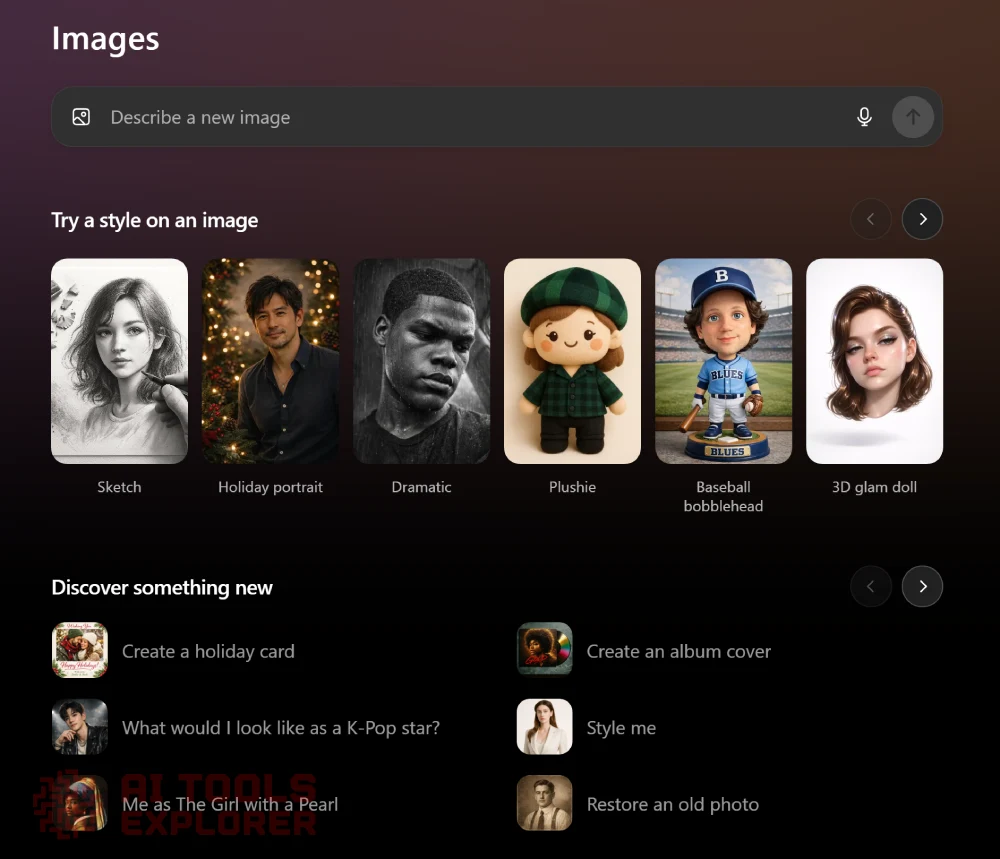
The sidebar now features a “Try a Style” menu with one-click buttons to transform your photos instantly.
| Use Case | Recommended Preset | Result |
| Career | Professional Job Photo | Swaps casual clothes for a suit and adds a clean office background. |
| Social Media | K-Pop Idol | Adds high-fashion outfits and editorial studio lighting to your selfie. |
| Home Design | Redecorate My Room | Visualizes new furniture in your actual room without changing the layout. |
| Artistic | 3D Graphite Sketch | Turns any photo into a pencil drawing with realistic paper grain. |
| Restoration | Restore Old Photo | Sharpens blurry photos and fixes colors to make them look modern. |
ChatGPT Photo Editor Featured styles (full list)
📷 1. Sketch Style
Transform any photo into a 3D graphite pencil sketch with incredible realism. This style mimics hand-drawn pencil art on textured paper, complete with:
- Visible paper grain
- Subtle smudges and graphite residue
- Pencil shavings, erasers, and sharpeners
- Your subject shown drawing as the sketch comes to life
🎄 2. Holiday Portrait
Create a cozy, holiday card–ready portrait with:
- Warm, golden lighting
- Evergreen decor and soft twinkle lights
- Realistic facial preservation (not cartoonish)
- A timeless, festive photo aesthetic
🎭 3. Dramatic Black & White
Generate a cinematic headshot with:
- High contrast light and deep shadows
- Realistic rain droplets and wet textures
- Moody, emotional black-and-white tone
🧸 4. Plushie Style
Convert your subject into a cute, cuddly plush toy:
- Rounded proportions and soft fleece texture
- Embroidered facial features
- Warm, pastel colors and cozy design
⚾ 5. Baseball Bobblehead
Turn yourself into a collectible bobblehead figurine:
- Oversized, springy head
- Matte painted vinyl finish
- Simplified sculpted features
- Baseball uniform inspired by your clothing
💅 6. 3D Glam Doll
Get a hyper-stylized floating head render with:
- Glossy vinyl skin and slick hair
- Bratty, fashionable expression
- Chrome piercing and holographic makeup
- Clean white background and product-style lighting
✏️ 7. Doodle Drawing
Reimagine your image as a childlike doodle:
- Uneven, sketchy black linework
- Simplified, exaggerated features
- Endearing awkwardness like a spontaneous school notebook sketch
💥 8. Pop Art Comic
Become a character in a 1960s comic book:
- Bold outlines and halftone dots
- Flat primary colors
- Stylized facial expressions in mid-action drama
- Full-bleed layout, no borders
🎄 9. Glass Ornament
Turn your face or object into a holiday glass ornament:
- Glossy lacquer finish
- Sparkling reflections
- Metal topper and hanging loop
- Sculpted form with elegant curves
🎓 10. Art School Aesthetic
Capture a gentle, natural look inspired by art-school portfolios:
- Muted tones, soft lighting
- Casual, awkward poses in real-world settings
- Intimate and realistic over polished and perfect
🛸 11. Fisheye Future
Shoot into the future with a fisheye sci-fi portrait:
- Clinical white studio with harsh flash
- Wide-angle distortion
- Glossy surfaces and retro-futuristic feel
🖌️ 12. Inkwork
Get an expressive black-and-white ink illustration:
- Bold brush lines
- High contrast and energy
- Dynamic stroke movement
🍪 13. Sugar Cookie Portrait
See your face or object rendered as a holiday sugar cookie:
- Royal icing design
- Simplified facial or object features
- Festive decorations like holly, snowflakes, scarves
✨ 14. Holiday Card
Produce a tasteful holiday greeting photo:
- Warm styling and natural lighting
- Subtle seasonal elements
- Optional message or greeting text
🎤 15. K-Pop Idol Makeover
Transform into a glamorous K-pop star:
- High-fashion outfit styling
- Editorial lighting and camera-ready skin
- Natural identity preserved with subtle enhancement
- Modern K-pop photo shoot atmosphere
🖼️ 16. Girl with a Pearl Earring
Step into history with a classic Dutch oil painting look:
- Vermeer-inspired lighting and styling
- Your face preserved in a timeless portrait
💿 17. Vinyl Album Cover
Design a photo-realistic record sleeve:
- Glitter-covered face and hair
- One-word handwritten album title
- Multicolor vinyl on green marble table
👗 18. Style Me
Swap your outfit with a better-fitting, aesthetically styled one:
- Flattering wardrobe based on your features
- Original expression, lighting, and pose preserved
🧽 19. Restore an Old Photo
Revive aged or blurry images:
- Modern sharpness, vibrant colors
- Natural skin tones and lighting
- Retains authenticity without overediting
💼 20. Professional Job Photo
Create a studio-style headshot for resumes:
- Neat business attire, neutral expression
- Plain background and even lighting
- Perfect for job applications and LinkedIn
🔑 21. Keychain Figurine
Make a miniature keychain version of yourself:
- Toy-sized proportions with realistic finish
- Soft shadows and collectible look
🛋️ 22. Redecorate My Room
Use room photos to add realistic new furniture:
- Keeps lighting and layout consistent
- Adds sofas, art, bookshelves, etc., to match style
📦 23. Professional Product Photo
Generate a studio product image:
- Floating item on pure white background
- HDR lighting, edge clarity, no blur
👯 24. Matching Outfit Friends
Show friends or family in coordinated casual outfits:
- Grouped together in soft film tones
- Pets get matching outfits too!
🧍 25. Remove Background People
Remove strangers or distractions from photos:
Maintains main subject’s integrity
Seamless fill-in of background
ChatGPT Photo Editor Step-by-Step
- Open the Images Tab: Click the new Images icon in the ChatGPT sidebar (available on Web, iOS, and Android).
- Upload Your Image: Use the paperclip icon to upload a photo of yourself, a room, or an object.
- Select a Style: Choose a preset like “Plushie,” “Sugar Cookie,” or “Style Me” from the carousel.
- Refine with Text: Type specific changes, like “Make my jacket red” or “Remove the background.” You can run multiple editing tasks at the same time.
Why This Matters
This update makes the popular AI chatbot into ChatGPT Photo Editor and a legitimate competitor to professional editing software. It is no longer just for “AI art”; it is a practical tool for business owners who need product photos, job hunters who need headshots, and anyone who wants to quickly fix their favorite memories.
FAQ: ChatGPT Photo Editor & GPT-Image 1.5
What is the new ChatGPT photo editor?
How do I use the “Try a Style” presets in ChatGPT?
Does ChatGPT keep my real face when editing photos?
Can I edit specific parts of a photo without changing the whole image?
What are the best ChatGPT image styles for professional use?
– Professional Job Photo: For creating high-quality LinkedIn headshots.
– Professional Product Photo: For high-end commercial renders on white backgrounds.
– Restore Old Photo: For sharpening and color-correcting vintage or low-quality images.
